
Introduction
Choosing the right frontend technology has become more important than ever. Businesses expect lightning-fast websites, developers want better productivity, and users demand seamless experiences across every device. Two names dominate modern frontend development: React and Next.js.
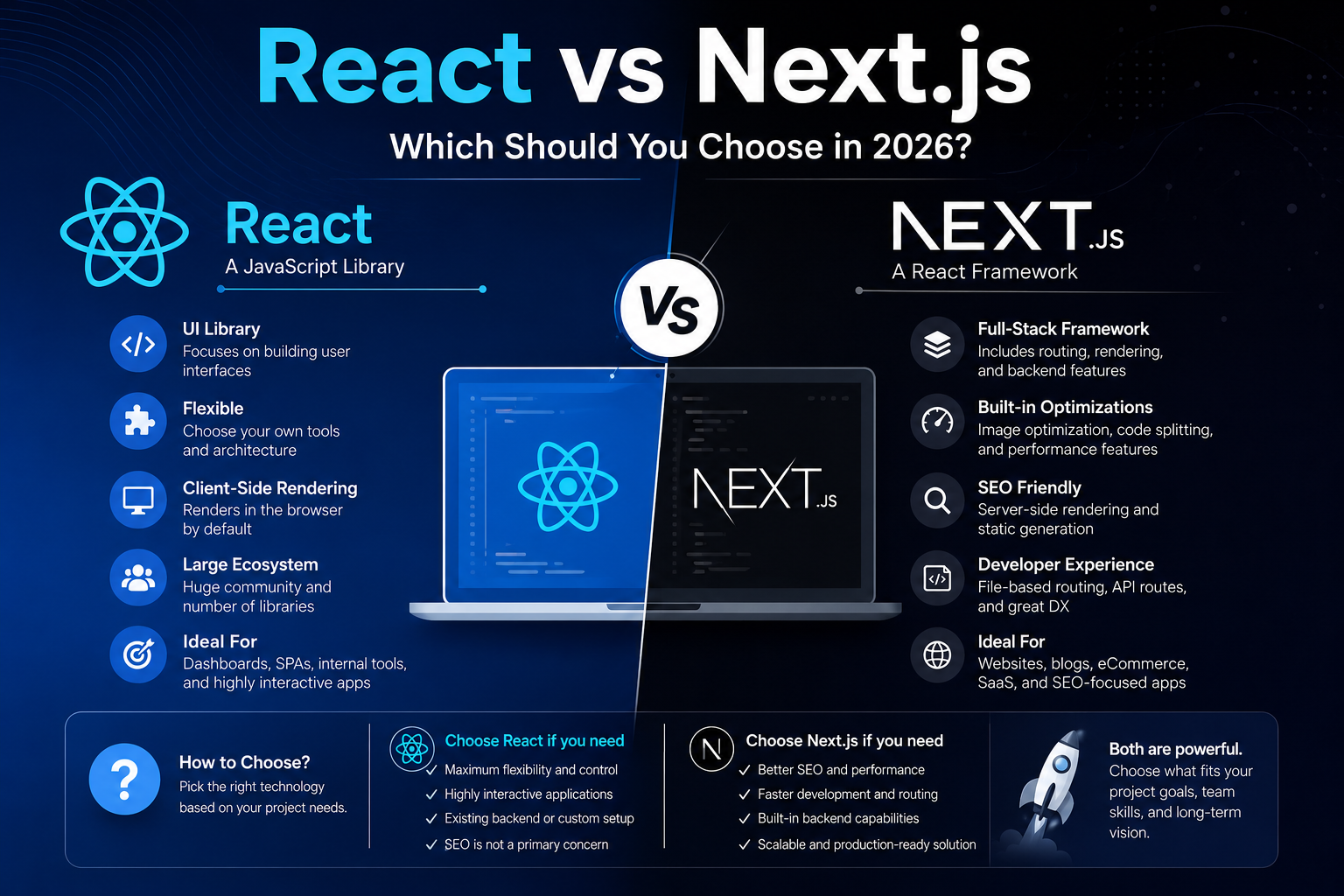
Although many people compare them as competing technologies, they’re not direct competitors. React is a JavaScript library for building user interfaces, while Next.js is a full-stack framework built on top of React that adds routing, server-side rendering, performance optimizations, API capabilities, and many production-ready features.
If you’re starting a new project, migrating an existing application, or planning your technology stack for 2026, understanding their differences can save months of development time and significantly improve your website’s performance.
In this guide, you’ll learn what React and Next.js are, how they differ, their advantages and limitations, when to use each, and which one is the better choice for different types of applications.
Key Takeaways
- React is a UI library, while Next.js is a React framework.
- Next.js includes routing, rendering strategies, and performance optimizations out of the box.
- React provides greater flexibility but requires additional setup.
- Next.js generally delivers better SEO and faster initial page loads.
- React is ideal for highly interactive applications and custom architectures.
- Next.js is the preferred choice for most modern production websites.
- Choosing the right technology depends on your project’s goals rather than popularity.
Understanding React
React is an open-source JavaScript library developed by Meta for building interactive user interfaces.
Instead of manipulating the browser’s DOM directly, React uses a Virtual DOM to efficiently update only the parts of the page that change.
React focuses only on the UI layer. Everything else—routing, authentication, state management, SEO optimization, data fetching, and deployment—is left to developers.
Key Features
- Component-based architecture
- Virtual DOM
- One-way data flow
- Rich ecosystem
- Large community
- Excellent tooling
Example Component
					function Welcome() {
  return <h1>Welcome to EnableFlow!</h1>;
}
React keeps applications modular, reusable, and easy to maintain.
Understanding Next.js
Next.js is a production-ready React framework developed by Vercel.
It builds upon React by adding features required for real-world applications.
These include:
- File-based routing
- Server-side rendering (SSR)
- Static Site Generation (SSG)
- Incremental Static Regeneration (ISR)
- Image optimization
- Metadata management
- API routes
- Middleware
- Edge rendering
- Built-in performance optimization
With the App Router introduced in recent versions, Next.js has become a complete full-stack framework.
React vs Next.js at a Glance
|
Feature |
React |
Next.js |
|
Type |
UI Library |
React Framework |
|
Routing |
External library |
Built-in |
|
SEO |
Limited by default |
Excellent |
|
Server Rendering |
Manual |
Built-in |
|
Static Generation |
No |
Yes |
|
API Routes |
No |
Yes |
|
Image Optimization |
Manual |
Built-in |
|
Performance |
Depends on implementation |
Optimized by default |
|
Learning Curve |
Moderate |
Moderate |
|
Full Stack Support |
No |
Yes |
Rendering Methods Explained
Rendering plays a major role in website performance and SEO.
Client-Side Rendering (CSR)
React traditionally renders pages inside the browser.
Flow:
graph LR
Browser –> JavaScript
JavaScript –> React
React –> DOM
DOM –> User
Advantages
- Rich interactions
- Excellent SPA experience
Disadvantages
- Slower first page load
- Poor SEO without additional work
Server-Side Rendering (SSR)
The server generates HTML before sending it to users.
graph LR
User –> Server
Server –> HTML
HTML –> Browser
Browser –> Hydration
Benefits
- Faster first paint
- Better SEO
- Improved Core Web Vitals
Static Site Generation (SSG)
Pages are generated during build time.
Perfect for:
- Blogs
- Documentation
- Marketing websites
- Landing pages
Incremental Static Regeneration (ISR)
Only changed pages are regenerated without rebuilding the entire website.
Ideal for
- News websites
- Product catalogs
- Large documentation sites
Performance Comparison
Performance affects both user experience and search rankings.
React
Performance depends on:
- Build configuration
- Code splitting
- Lazy loading
- Image optimization
- Caching strategy
Developers must configure these manually.
Next.js
Includes performance optimizations by default.
Examples include:
- Automatic code splitting
- Image optimization
- Font optimization
- Streaming
- Server Components
- Partial prerendering
- Edge caching
For most production websites, Next.js provides better performance with less configuration.
SEO Comparison
SEO is one of the biggest deciding factors.
React
Since React renders content in the browser, search engines may initially receive minimal HTML. While modern search engines can execute JavaScript, relying solely on client-side rendering can still affect crawling efficiency, indexing speed, and the visibility of important content if not configured properly.
Additional tools are often required.
Examples:
- React Helmet
- Dynamic rendering
- Prerendering services
Next.js
Next.js generates HTML before the page reaches users.
Benefits include:
- Faster indexing
- Rich metadata
- Better Open Graph support
- Structured data integration
- Improved Core Web Vitals
For SEO-focused websites, Next.js has a significant advantage.
Developer Experience
React
Offers maximum flexibility.
You choose:
- Router
- Build tools
- State management
- Authentication
- Deployment
Ideal for experienced teams.
Next.js
Provides sensible defaults.
Most features work immediately after installation.
Developers spend less time configuring infrastructure and more time building features.
Routing Differences
React
Requires React Router.
Example
<Route path="/about" element={<About />} />
Next.js
Uses file-based routing.
					app/

about/

page.jsx
No routing configuration required.
Data Fetching Approaches
React typically relies on external libraries such as:
- Axios
- React Query
- SWR
Next.js supports:
- Server Components
- Fetch API
- Route Handlers
- Server Actions
This reduces boilerplate and simplifies data fetching.
Backend Capabilities
React requires a separate backend.
Examples:
- Node.js
- PHP
- Laravel
- Django
- Spring Boot
Next.js can include backend logic through API Routes and Route Handlers.
Example:
app/api/users/route.js
This enables full-stack development in a single project.
Scalability
Both technologies scale well.
React scales through a flexible ecosystem, while Next.js provides built-in conventions that help large teams maintain consistency.
Large organizations using React often establish their own architecture, whereas Next.js encourages a standardized project structure from the start.
Deployment Options
React applications can be deployed on:
- Netlify
- Vercel
- AWS
- Firebase
- Cloudflare Pages
Next.js supports all of the above while also taking advantage of advanced features like edge functions and server-side rendering when deployed on compatible platforms.
When to Choose React
Choose React when:
- Building internal dashboards
- Developing complex single-page applications
- You already have a backend API
- You require maximum architectural flexibility
- SEO is not a primary concern
Examples include:
- CRM systems
- Admin panels
- Analytics dashboards
- Enterprise portals
When to Choose Next.js
Choose Next.js when:
- Building business websites
- Creating SaaS products
- Developing blogs
- Launching eCommerce stores
- Optimizing for search engines
- Improving Core Web Vitals
Examples include:
- Company websites
- Documentation portals
- Marketing sites
- News platforms
- Product catalogs
Migration from React to Next.js
Many existing React applications can migrate gradually.
Recommended steps:
- Audit your current routing and build setup.
- Move pages into the App Router structure.
- Replace client-side routing with file-based routing.
- Migrate metadata to Next.js metadata APIs.
- Optimize images using the built-in Image component.
- Move appropriate components to Server Components.
- Test SEO, performance, and Core Web Vitals after migration.
A phased migration helps minimize risk while improving performance over time.
Best Practices
- Use TypeScript for better maintainability.
- Keep components small and reusable.
- Avoid unnecessary client-side rendering.
- Optimize images and fonts.
- Monitor Core Web Vitals regularly.
- Implement proper caching strategies.
- Follow accessibility guidelines.
- Keep dependencies up to date.
Common Mistakes
Treating React and Next.js as Competitors
Remember that Next.js is built on React rather than replacing it.
Choosing React for SEO-Heavy Websites
Content-first websites usually benefit more from server-side rendering or static generation.
Overusing Client Components
In Next.js, render components on the server whenever possible and only opt into client components when browser-specific features are required.
Ignoring Performance Metrics
Measure performance using tools like Lighthouse and Core Web Vitals instead of relying on assumptions.
Migrating Everything at Once
Large projects are easier to migrate in stages, allowing teams to validate performance and functionality incrementally.
Pro Tips
- Learn React fundamentals before diving into Next.js.
- Prefer Server Components for data-heavy pages.
- Use dynamic imports for large client-side libraries.
- Cache data whenever appropriate.
- Optimize metadata for every page.
- Regularly monitor Core Web Vitals and fix regressions early.
- Plan your folder structure before development begins.
Frequently Asked Questions
Is Next.js replacing React?
No. Next.js is built on top of React and extends its capabilities with routing, rendering strategies, and production-ready features.
Which is easier to learn?
React has fewer concepts initially, but learning Next.js after React is relatively straightforward because it builds on the same fundamentals.
Which is better for SEO?
Next.js generally offers stronger SEO support thanks to server-side rendering, static generation, and built-in metadata management.
Can I build APIs with React?
Not directly. React focuses on the user interface, so you'll typically need a separate backend service.
Can Next.js replace my backend?
For many applications, yes. API Routes and Route Handlers can handle authentication, database access, and business logic. Larger systems may still benefit from dedicated backend services.
Which offers better performance?
Both can be fast, but Next.js includes performance optimizations that reduce the amount of manual configuration required.
Is React still worth learning in 2026?
Absolutely. Understanding React remains essential because many modern frameworks, including Next.js, are built on it.
Which should startups choose?
For most startups building public-facing products, Next.js offers an excellent balance of developer experience, SEO, and performance.
Can I migrate an existing React app?
Yes. Many teams migrate incrementally by moving routes and pages one section at a time.
Which technology has better community support?
Both enjoy large, active communities and extensive ecosystems, making it easy to find libraries, tutorials, and solutions to common problems.
Conclusion
React and Next.js are both outstanding technologies, but they solve different problems.
React excels as a flexible library for building dynamic user interfaces, giving developers complete control over application architecture. Next.js builds on that foundation by providing routing, server-side rendering, static generation, API capabilities, and numerous performance optimizations that are essential for modern web applications.
For projects where SEO, performance, scalability, and developer productivity are priorities, Next.js is often the stronger choice. React remains an excellent option for highly interactive applications, internal tools, and situations where a custom architecture is preferred.
Before starting your next project, evaluate your application’s requirements, expected traffic, SEO needs, hosting environment, and long-term maintenance goals. Choosing the right technology early can reduce complexity and create a better experience for both developers and users.