
Introduction
Cloud computing has transformed how businesses build, deploy, and manage applications. But behind every cloud application—whether it’s a website, mobile app, or enterprise platform—is a robust networking infrastructure that enables secure and reliable communication between users, servers, databases, and cloud services. This is where cloud networking comes into play.
Traditional networking relied on physical routers, switches, and dedicated data centers. While effective, these environments often required significant investment, manual configuration, and ongoing maintenance. Modern cloud networking replaces much of this complexity with software-defined, scalable, and highly available networking services that can be managed from anywhere.
Whether you’re deploying a simple web application, migrating an enterprise workload to the cloud, or preparing for a career in IT, understanding cloud networking is becoming an essential skill. Major cloud providers such as Amazon Web Services (AWS), Microsoft Azure, and Google Cloud Platform all rely on similar networking principles, making these concepts valuable regardless of the platform you choose.
In this guide, you’ll learn what cloud networking is, how it works, its core components, common deployment models, real-world use cases, and best practices for building secure and efficient cloud networks. By the end, you’ll have a solid foundation for understanding modern cloud infrastructure and networking concepts.
Key Takeaways
- Cloud networking connects cloud resources using virtual networking technologies instead of relying solely on physical hardware.
- Software-defined networking enables flexible, scalable, and centrally managed cloud infrastructure.
- Virtual networks, subnets, routing tables, and security groups form the foundation of cloud networking.
- Cloud networking supports public, private, hybrid, and multi-cloud deployments.
- Built-in services such as load balancers, VPNs, DNS, and firewalls improve availability and security.
- Proper network design reduces latency, improves reliability, and strengthens security.
- Understanding cloud networking is essential for developers, system administrators, DevOps engineers, and IT professionals.
What Is Cloud Networking?
Cloud networking is the practice of designing, managing, and securing computer networks using cloud-based infrastructure and services instead of relying entirely on physical networking equipment. Rather than purchasing and configuring routers, switches, firewalls, and network appliances for every environment, organizations use virtual networking resources provided by cloud platforms.
These virtual resources behave much like traditional networking devices but are created, configured, and managed through software. This approach enables organizations to build complex network architectures in minutes instead of days or weeks.
Simply put, cloud networking allows applications, virtual machines, databases, containers, and users to communicate securely over the internet or private cloud networks.
A Simple Example
Imagine you’re hosting an e-commerce website.
Your application may consist of:
- A web server
- An application server
- A database server
- A storage service
- Users accessing the website worldwide
Cloud networking ensures that:
- Users reach the correct server.
- Traffic is routed efficiently.
- Sensitive databases remain private.
- Security rules protect every component.
- Data flows quickly and reliably.
Without cloud networking, managing these connections would require extensive physical infrastructure and manual configuration.
Why Cloud Networking Matters
Modern businesses demand applications that are always available, highly secure, and capable of handling millions of users. Traditional networking often struggles to meet these expectations due to hardware limitations and manual management.
Cloud networking addresses these challenges by offering flexibility, scalability, and automation.
1. Scalability
As application traffic grows, cloud networking allows organizations to expand their infrastructure without replacing physical hardware.
For example, an online shopping platform can automatically handle increased traffic during holiday sales by provisioning additional cloud resources.
2. High Availability
Cloud providers distribute infrastructure across multiple geographic regions and availability zones.
If one data center experiences an outage, traffic can automatically be redirected to another location, minimizing downtime.
3. Simplified Management
Instead of configuring networking hardware manually, administrators manage virtual networks using intuitive dashboards, command-line tools, or Infrastructure as Code (IaC).
Tasks such as:
- Creating subnets
- Updating routing rules
- Configuring firewalls
- Deploying VPNs
can often be completed in minutes.
4. Cost Efficiency
Organizations only pay for the networking resources they use.
This eliminates large upfront investments in networking hardware while reducing maintenance costs.
5. Enhanced Security
Cloud networking includes built-in security features such as:
- Network segmentation
- Firewalls
- Identity-based access controls
- Encryption
- Security groups
- Distributed denial-of-service (DDoS) protection
These capabilities help organizations protect applications and sensitive data.
How Cloud Networking Works
At its core, cloud networking creates virtual communication pathways between cloud resources.
Instead of connecting physical devices with cables, cloud providers create software-defined virtual networks that operate on top of their global infrastructure.
A simplified workflow looks like this:

Step-by-Step Process
- A user sends a request from a browser or mobile application.
- The request travels through the internet.
- A cloud load balancer receives the request.
- The load balancer forwards the request to an application server.
- The application accesses databases or storage services within a secure virtual network.
- The processed response is sent back to the user.
Throughout this process, routing tables, firewalls, DNS services, encryption, and security policies ensure that data reaches the correct destination securely and efficiently.
Traditional Networking vs Cloud Networking
| Feature | Traditional Networking | Cloud Networking |
| Infrastructure | Physical hardware | Virtual infrastructure |
| Deployment | Manual | Automated |
| Scalability | Limited | Virtually unlimited |
| Cost Model | Capital expenditure (CapEx) | Pay-as-you-go (OpEx) |
| Management | On-premises | Cloud console, CLI, APIs |
| Availability | Depends on local infrastructure | Multi-region redundancy |
| Maintenance | Hardware replacement required | Managed by cloud provider |
| Provisioning Time | Days or weeks | Minutes |
Core Components of Cloud Networking
Understanding cloud networking becomes much easier when you break it down into its core building blocks. Most cloud providers offer similar networking components, even though the terminology may vary slightly.
1. Virtual Network
A virtual network is an isolated, software-defined network within the cloud where your resources communicate securely.
Examples include:
- Amazon VPC
- Azure Virtual Network (VNet)
- Google Cloud VPC
A virtual network functions much like a traditional corporate network but exists entirely in software.
2. Subnets
A subnet divides a virtual network into smaller, more manageable segments.
For example:
Virtual Network
│
├── Public Subnet
│ ├── Web Servers
│ └── Load Balancer
│
└── Private Subnet
├── Database
└── Internal APIs
Separating resources into public and private subnets improves both security and performance.
3. IP Addressing
Every cloud resource requires an IP address to communicate.
Cloud platforms typically assign:
- Private IP addresses for internal communication
- Public IP addresses for internet-facing resources
Efficient IP planning ensures scalability and prevents address conflicts.
4. Routing Tables
Routing tables determine how network traffic moves between subnets, gateways, and external networks.
For example:
| Destination | Next Hop |
| Internal subnet | Local route |
| Internet | Internet Gateway |
| Corporate network | VPN Gateway |
Proper routing ensures data reaches the intended destination efficiently.
5. Internet Gateway
An Internet Gateway enables communication between your cloud network and the public internet.
Resources such as web servers or APIs that need to be publicly accessible typically use an Internet Gateway.
Private databases generally do not.
6. Network Access Controls
Cloud providers use multiple security layers to regulate network traffic.
These include:
- Security Groups
- Network Access Control Lists (ACLs)
- Firewall Rules
- Identity and Access Management (IAM)
Together, these controls determine who can access specific resources and under what conditions.
Real-World Example: A Modern E-Commerce Application
Consider an online store hosted in the cloud.
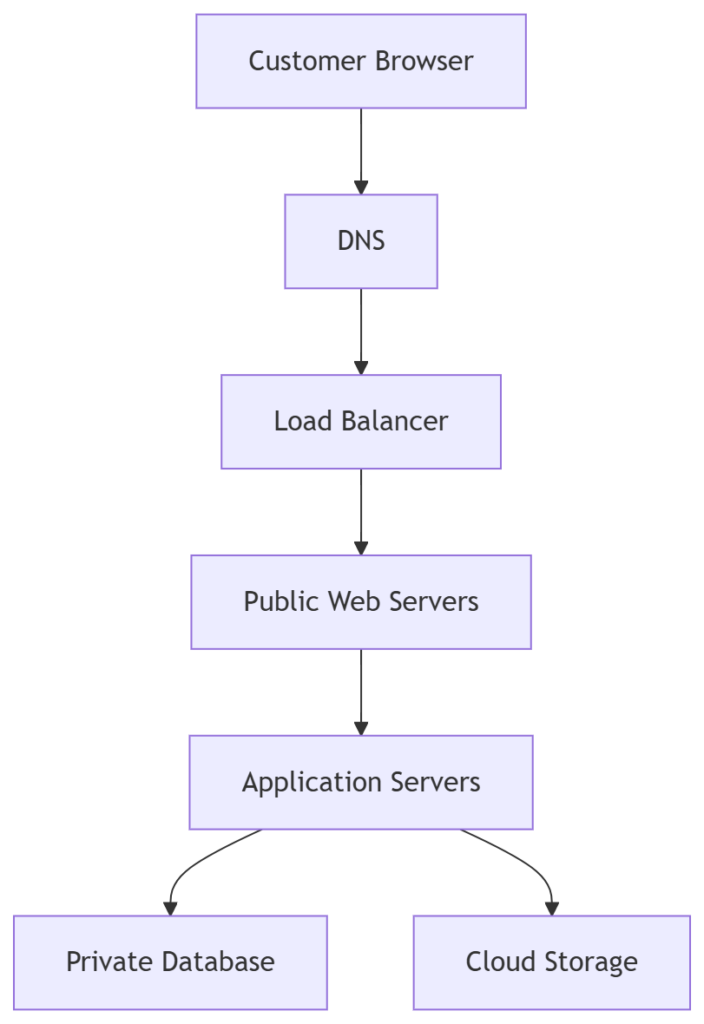
In this architecture:
- Customers access the website using its domain name.
- DNS resolves the domain to the application’s IP address.
- A load balancer distributes incoming traffic across multiple web servers.
- Application servers process requests and interact with the database.
- Product images and documents are stored in cloud object storage.
- Sensitive resources remain isolated within private subnets to enhance security.
This layered design improves scalability, performance, and resilience while maintaining strong security boundaries.
Types of Cloud Networking
Cloud networking isn’t a one-size-fits-all solution. Organizations choose different networking models based on their security requirements, scalability needs, compliance obligations, and existing infrastructure.
Understanding these deployment models helps you determine which approach is best suited for a particular workload
Public Cloud Networking
Public cloud networking refers to networking services hosted and managed by a third-party cloud provider. The underlying infrastructure is shared among multiple customers, but each customer’s resources remain logically isolated.
Popular public cloud providers include:
- Amazon Web Services (AWS)
- Microsoft Azure
- Google Cloud Platform (GCP)
Although the physical infrastructure is shared, your virtual networks, routing rules, security policies, and workloads remain isolated from other customers.
Advantages
- Low upfront investment
- Highly scalable
- Global availability
- Managed infrastructure
- Rapid deployment
Best For
- Startups
- SaaS applications
- Web hosting
- Mobile applications
- Development and testing
Private Cloud Networking
Private cloud networking uses dedicated cloud infrastructure for a single organization.
This infrastructure may be hosted:
- On-premises
- In a private data center
- By a cloud provider
Unlike the public cloud, no hardware resources are shared with other organizations.
Advantages
- Greater control
- Enhanced security
- Regulatory compliance
- Custom networking policies
Best For
- Financial institutions
- Government agencies
- Healthcare organizations
- Enterprises handling sensitive data
Hybrid Cloud Networking
Hybrid cloud networking combines on-premises infrastructure with public cloud services, allowing workloads and data to move securely between environments.
Instead of replacing an existing data center, organizations extend it into the cloud.
Example
A company might keep:
- Customer databases on-premises
- Public website in AWS
- Analytics platform in Azure
Both environments communicate securely through VPNs or dedicated private connections.

Advantages
- Easier cloud migration
- Lower migration risk
- Better disaster recovery
- Flexible workload placement
Multi-Cloud Networking
Multi-cloud networking connects infrastructure across multiple cloud providers.
Rather than depending on one vendor, organizations distribute workloads across several platforms.
Example
- AWS hosts web applications.
- Azure hosts business applications.
- Google Cloud handles AI workloads.
All three environments communicate securely using cloud networking technologies.
Benefits
- Avoid vendor lock-in
- Improve availability
- Optimize pricing
- Use specialized cloud services
- Enhance disaster recovery
Public vs Private vs Hybrid vs Multi-Cloud
| Feature | Public Cloud | Private Cloud | Hybrid Cloud | Multi-Cloud |
| Ownership | Shared | Dedicated | Mixed | Multiple Providers |
| Cost | Low | High | Medium | Medium–High |
| Scalability | Excellent | Moderate | Excellent | Excellent |
| Security | High | Very High | Very High | High |
| Flexibility | High | Medium | Excellent | Excellent |
| Best For | Startups | Enterprises | Growing Businesses | Large Enterprises |
What Is a Virtual Private Cloud (VPC)?
A Virtual Private Cloud (VPC) is a logically isolated virtual network inside a public cloud provider.
Think of it as your own private network within a massive cloud data center.
Even though thousands of customers share the same physical infrastructure, your VPC remains isolated through software-defined networking.
A VPC allows you to control:
- IP address ranges
- Subnets
- Routing
- Firewalls
- Internet access
- VPN connections
Without a VPC, managing secure cloud applications would be significantly more difficult.
Why Is a VPC Important?
A VPC gives organizations complete control over how cloud resources communicate.
It enables administrators to:
- Isolate applications
- Protect databases
- Restrict internet access
- Connect to on-premises networks
- Apply custom security rules
Nearly every production cloud application begins with creating a VPC.
VPC Architecture
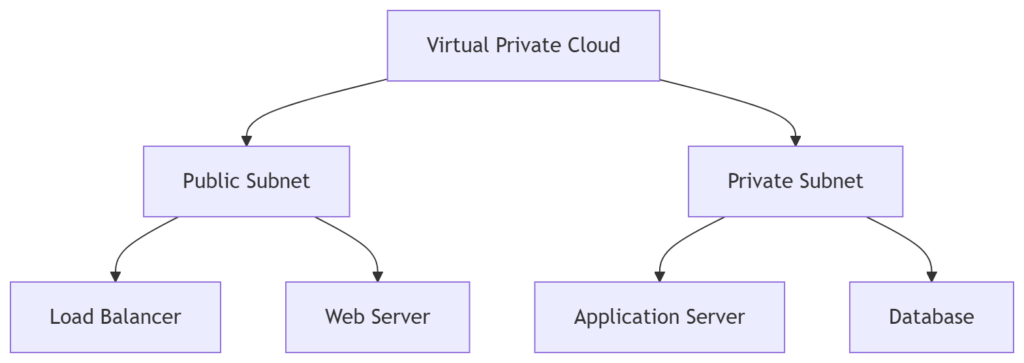
In this design:
- Users access the public load balancer.
- Web servers receive incoming requests.
- Application servers process business logic.
- Databases remain inaccessible from the internet.
This layered architecture improves both security and performance.
Understanding Subnets
A subnet divides a virtual network into smaller sections.
Instead of placing every server inside one large network, cloud architects organize workloads into separate subnets.
Common subnet types include:
Public Subnet
Resources inside a public subnet can communicate directly with the internet.
Typical examples:
- Load Balancers
- Web Servers
- Bastion Hosts
- API Gateways
Private Subnet
Resources inside private subnets cannot be accessed directly from the internet.
Examples include:
- Databases
- Internal APIs
- Authentication Servers
- Cache Servers
Private subnets significantly reduce the attack surface.
Why Separate Public and Private Resources?
Imagine storing your company’s customer database on a publicly accessible server.
Any security vulnerability could expose sensitive information.
Instead, organizations expose only the web layer while keeping critical systems isolated.
Example architecture:
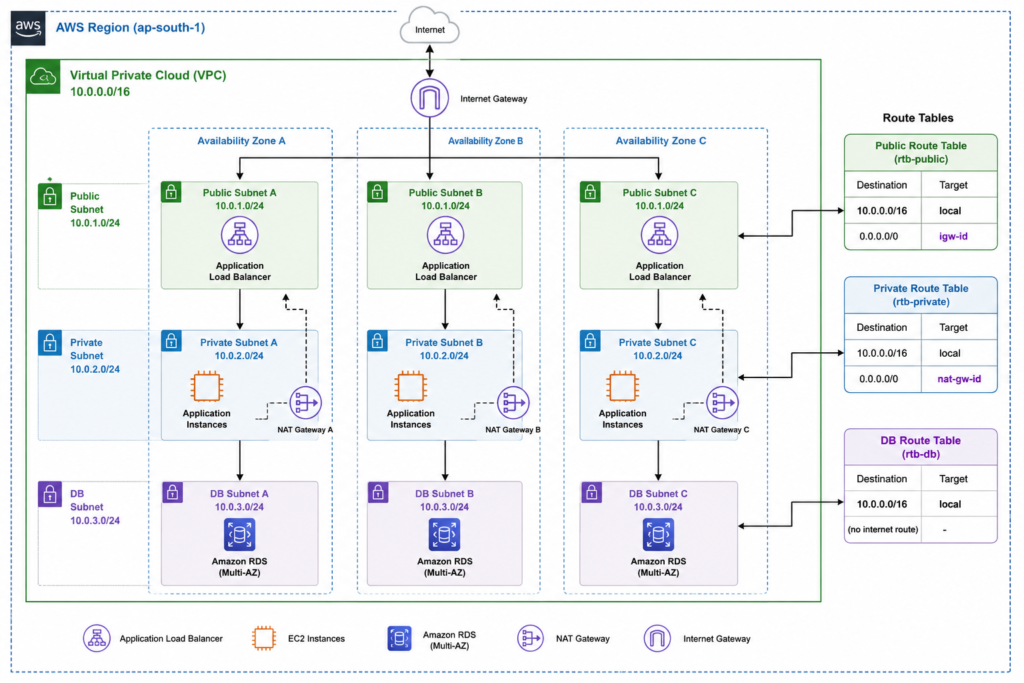
This is one of the most common cloud networking designs.
Routing in Cloud Networking
Every packet traveling through a network needs directions.
Routing determines where network traffic should go.
Cloud providers use routing tables to define these paths.
Example routing table:
| Destination | Route |
| Local VPC | Local |
| Internet | Internet Gateway |
| Private Network | VPN Gateway |
| Another Cloud | Peering Connection |
Incorrect routing can result in:
- Network failures
- Increased latency
- Security risks
- Application downtime
Proper route planning is essential for reliable cloud networking.
Internet Gateway
An Internet Gateway enables resources inside a VPC to communicate with the internet.
Typical use cases:
- Hosting websites
- Public APIs
- Downloading software updates
- Serving static content
Resources without an Internet Gateway remain isolated from public internet traffic.
NAT Gateway
A Network Address Translation (NAT) Gateway allows private resources to access the internet without exposing them to incoming internet connections.
Example:
Your application server needs to:
- Download operating system updates
- Install software packages
- Access external APIs
It can do so through a NAT Gateway while remaining inaccessible from the public internet.

This approach improves security while maintaining outbound connectivity.
Security Groups vs Network ACLs
Cloud providers use multiple layers of network security.
Security Groups
Security Groups act like virtual firewalls attached directly to cloud resources.
They define:
- Allowed inbound traffic
- Allowed outbound traffic
- Port access
- Protocols
- Source IP addresses
Example:
Allow:
- HTTPS (443)
- HTTP (80)
- SSH (22 from admin IP only)
Block everything else.
Network ACLs
Network Access Control Lists (ACLs) operate at the subnet level.
Unlike Security Groups, ACLs can contain both:
- Allow rules
- Deny rules
They provide an additional security layer before traffic reaches cloud resources.
DNS in Cloud Networking
Humans remember domain names.
Computers communicate using IP addresses.
The Domain Name System (DNS) translates domain names into IP addresses.
Example:
www.example.com
↓
192.168.x.x
Cloud providers offer managed DNS services that provide:
- Fast DNS resolution
- Global availability
- Health checks
- Failover routing
- Traffic management
Without DNS, users would need to remember numerical IP addresses instead of domain names.
VPN in Cloud Networking
A Virtual Private Network (VPN) creates an encrypted tunnel between networks.
Organizations commonly use VPNs to connect:
- Offices
- Remote employees
- Branch locations
- On-premises data centers
- Cloud VPCs

Example:
Benefits include:
- Secure communication
- Data encryption
- Remote access
- Hybrid cloud connectivity
Dedicated Private Connections
For organizations requiring higher bandwidth and lower latency than a VPN can provide, cloud providers offer dedicated private network connections.
Examples include:
- AWS Direct Connect
- Azure ExpressRoute
- Google Cloud Interconnect
These services create a direct link between an organization’s data center and the cloud provider’s network, bypassing the public internet.
Typical use cases:
- Large enterprise workloads
- Financial systems
- Healthcare applications
- Real-time analytics
- High-volume data transfers
Load Balancing in Cloud Networking
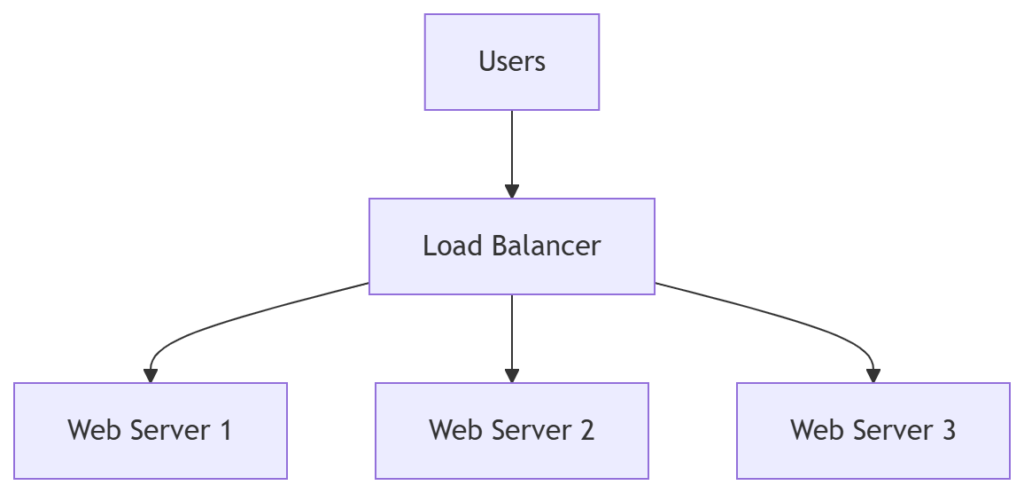
A load balancer distributes incoming requests across multiple servers.
Instead of sending all traffic to one server, it spreads requests evenly.
Benefits
- High availability
- Improved performance
- Fault tolerance
- Better scalability
- Automatic health checks
If one server fails, the load balancer redirects traffic to healthy servers.
Content Delivery Network (CDN)
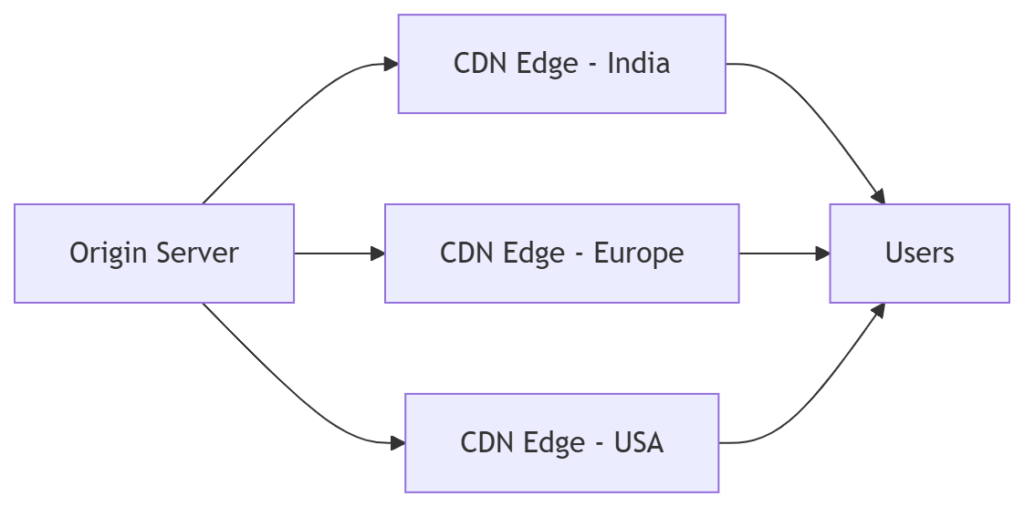
A Content Delivery Network (CDN) is a globally distributed network of edge servers that caches static content closer to users.
Instead of every request traveling to the origin server, the CDN serves cached content from the nearest edge location.
Examples of cached content:
- Images
- Videos
- CSS files
- JavaScript
- Fonts
- Downloads
Benefits
- Faster page load times
- Reduced latency
- Lower bandwidth usage
- Better user experience
- Improved resilience against traffic spikes
Benefits of Cloud Networking
Cloud networking has become the foundation of modern IT infrastructure because it enables organizations to build applications that are scalable, secure, and highly available. Whether you’re running a personal website or managing enterprise systems, cloud networking provides advantages that traditional networking struggles to match.
1. Scalability on Demand
One of the biggest advantages of cloud networking is the ability to scale resources as demand changes.
Instead of purchasing additional networking hardware, organizations can provision new virtual networks, load balancers, gateways, or servers within minutes.
Example
An online shopping platform experiences a surge in visitors during a festive sale. Cloud networking automatically distributes traffic across additional servers, ensuring the website remains responsive without requiring manual intervention.
Benefits:
- Handles sudden traffic spikes
- Reduces downtime
- Supports business growth
- Eliminates hardware limitations
2. Global Connectivity
Cloud providers operate data centers across multiple regions and availability zones worldwide.
Applications can be deployed closer to end users, reducing network latency and improving performance.
Example
A company serving customers in Asia, Europe, and North America can deploy workloads in multiple regions to provide faster access for users regardless of their location.
3. High Availability and Reliability
Cloud networking is designed with redundancy in mind.
If one server, network device, or even an entire availability zone fails, traffic can be redirected automatically to healthy resources.
Common High-Availability Features
- Multiple Availability Zones
- Automatic failover
- Redundant gateways
- Load balancing
- Health checks
This architecture minimizes downtime and improves business continuity.
4. Cost Efficiency
Traditional networking often requires significant capital investment in routers, switches, firewalls, and maintenance.
Cloud networking follows a pay-as-you-go pricing model.
Organizations pay only for the resources they consume.
Savings Include
- No expensive networking hardware
- Lower maintenance costs
- Reduced operational overhead
- Minimal upfront investment
5. Simplified Management
Cloud networking services are managed through centralized dashboards, APIs, or Infrastructure as Code (IaC) tools.
Administrators can:
- Create virtual networks
- Configure routing
- Update firewall rules
- Deploy VPNs
- Monitor traffic
without physically accessing networking equipment.
6. Enhanced Security
Security is built into every layer of cloud networking.
Cloud providers offer services such as:
- Identity and Access Management (IAM)
- Security Groups
- Network ACLs
- Encryption
- Web Application Firewalls (WAF)
- Distributed Denial-of-Service (DDoS) protection
- Private connectivity options
These tools help organizations implement defense-in-depth strategies.
Common Challenges in Cloud Networking
Although cloud networking offers many advantages, it also introduces new challenges that organizations must address.
1. Misconfigured Security Rules
One of the most common causes of cloud security incidents is incorrect firewall or security group configuration.
Example
Allowing SSH (Port 22) access from any IP address instead of restricting it to trusted administrator networks.
Best Practice
- Follow the Principle of Least Privilege
- Review security rules regularly
- Remove unused firewall entries
2. Complex Multi-Cloud Environments
Managing networking across AWS, Azure, and Google Cloud simultaneously can increase operational complexity.
Challenges include:
- Different networking terminology
- Separate management consoles
- Inconsistent security policies
- Cross-cloud connectivity
Organizations should standardize networking practices and use automation whenever possible.
3. Network Latency
Latency refers to the time required for data to travel between systems.
Factors affecting latency include:
- Geographic distance
- Internet congestion
- Poor routing
- Inefficient application architecture
Ways to Reduce Latency
- Deploy applications closer to users
- Use Content Delivery Networks (CDNs)
- Optimize routing paths
- Cache frequently accessed data
4. Cost Management
Cloud networking resources may appear inexpensive individually, but costs can accumulate over time.
Common chargeable resources include:
- Public IP addresses
- Load balancers
- NAT Gateways
- VPN connections
- Data transfer
- Inter-region traffic
Regular cost monitoring helps prevent unexpected expenses.
5. Compliance Requirements
Industries such as healthcare, banking, and government often require strict compliance with regulations.
Organizations must ensure:
- Data residency requirements are met
- Sensitive information is encrypted
- Audit logs are retained
- Access is controlled and monitored
Cloud Networking Security Best Practices
Security should be integrated into every stage of cloud network design rather than added as an afterthought.
Use the Principle of Least Privilege
Grant only the permissions necessary for users, applications, and services.
Avoid assigning administrative privileges unless absolutely required.
Keep Sensitive Resources Private
Public internet access should be limited to services that require it.
Examples of private resources:
- Databases
- Internal APIs
- Cache servers
- Authentication services
Use private subnets to isolate these workloads.
Enable Encryption
Encrypt data:
- In transit (using HTTPS, TLS, VPNs)
- At rest (using cloud encryption services)
Encryption helps protect sensitive information even if unauthorized access occurs.
Implement Network Segmentation
Separate workloads based on function and security requirements.
Example architecture:
Internet
│
Load Balancer
│
Web Tier
│
Application Tier
│
Database Tier
Benefits include:
- Reduced attack surface
- Improved access control
- Easier compliance
- Better fault isolation
Monitor Network Activity
Use cloud monitoring and logging services to detect unusual behavior.
Monitor:
- Failed login attempts
- Traffic spikes
- Firewall rule changes
- VPN usage
- Resource health
Continuous monitoring enables faster incident detection and response.
Regularly Review Firewall Rules
As environments evolve, firewall rules often become outdated.
Perform periodic audits to:
- Remove unused rules
- Restrict unnecessary ports
- Eliminate redundant policies
Use Infrastructure as Code (IaC)
Managing cloud networking manually increases the risk of configuration errors.
IaC tools allow networking infrastructure to be defined in code.
Popular tools include:
- Terraform
- AWS CloudFormation
- Azure Bicep
- Pulumi
Benefits include:
- Version control
- Consistency
- Repeatable deployments
- Easier disaster recovery
Real-World Cloud Networking Use Cases
Cloud networking powers a wide range of modern applications across industries.
E-Commerce Platforms
Online stores require:
- Global availability
- Secure payment processing
- Fast page loads
- High availability during peak traffic
Cloud networking enables these capabilities through load balancing, CDNs, and scalable virtual networks.
Streaming Services
Video platforms deliver content to millions of users simultaneously.
Cloud networking supports:
- Global edge locations
- Content caching
- High-bandwidth delivery
- Automatic scaling
Remote Work
Organizations with distributed teams rely on cloud networking for secure access to internal resources.
Common technologies include:
- VPNs
- Identity management
- Zero Trust access
- Private connectivity
Healthcare
Hospitals use cloud networking to securely connect:
- Electronic Health Records (EHR)
- Medical imaging systems
- Telemedicine platforms
- Patient portals
Strong encryption and network segmentation help meet regulatory requirements.
Financial Services
Banks require:
- Low-latency communication
- High availability
- Strict security controls
- Disaster recovery
Cloud networking provides resilient infrastructure while supporting compliance standards.
AWS vs Azure vs Google Cloud Networking
Although AWS, Azure, and Google Cloud share similar networking concepts, they use different terminology and services.
| Feature | AWS | Microsoft Azure | Google Cloud |
| Virtual Network | VPC | Virtual Network (VNet) | VPC |
| Firewall | Security Groups + NACLs | Network Security Groups (NSGs) | VPC Firewall Rules |
| VPN | Site-to-Site VPN | VPN Gateway | Cloud VPN |
| Dedicated Connection | Direct Connect | ExpressRoute | Cloud Interconnect |
| Load Balancer | Elastic Load Balancer (ELB) | Azure Load Balancer | Cloud Load Balancing |
| DNS | Route 53 | Azure DNS | Cloud DNS |
| CDN | Amazon CloudFront | Azure CDN | Cloud CDN |
Regardless of the provider, the underlying networking principles remain largely the same.
Best Practices
Following established best practices improves the reliability, security, and performance of cloud networks.
Design Before Deployment
Plan:
- IP address ranges
- Subnets
- Routing
- Security boundaries
before provisioning resources.
Keep Applications Highly Available
Deploy workloads across multiple Availability Zones or Regions whenever possible.
Avoid relying on a single server or location.
Automate Infrastructure
Use Infrastructure as Code (IaC) to deploy networking resources consistently.
Automation reduces human error and accelerates deployments.
Minimize Public Exposure
Only expose services that require public access.
Everything else should remain within private networks.
Monitor Costs
Track:
- Data transfer charges
- NAT Gateway usage
- Load balancer costs
- Public IP addresses
- Cross-region traffic
Regular cost reviews help optimize spending.
Regularly Test Disaster Recovery
Backups alone are not enough.
Verify that failover procedures and recovery plans work as expected.
Common Mistakes
Avoid these common pitfalls when designing or managing cloud networks.
Opening Too Many Firewall Ports
Restrict access to only the required ports and protocols.
Using a Single Availability Zone
A single-zone deployment creates a single point of failure.
Distribute workloads across multiple zones.
Ignoring Network Monitoring
Without monitoring, issues such as latency, failed connections, or suspicious traffic may go unnoticed.
Hardcoding IP Addresses
Dynamic cloud environments change frequently.
Use DNS, service discovery, or managed networking features instead of relying on fixed IP addresses.
Skipping Documentation
Document:
- Network diagrams
- IP ranges
- Firewall rules
- Routing policies
- VPN configurations
Good documentation simplifies troubleshooting and onboarding.
Pro Tips
- Design your network with future growth in mind to avoid costly redesigns.
- Use private subnets for databases and backend services whenever possible.
- Implement least-privilege access for users, applications, and services.
- Enable logging and monitoring from the beginning of every project.
- Automate networking with Infrastructure as Code to ensure consistency.
- Review firewall and routing rules regularly to eliminate unnecessary access.
- Use a CDN to improve performance for global users.
- Separate development, testing, and production environments into different virtual networks or accounts.
- Build for failure by using redundant resources across multiple Availability Zones.
- Stay informed about new networking services and security features released by your cloud provider.
Frequently Asked Questions
1. What is cloud networking in simple terms?
Cloud networking is the process of connecting cloud-based resources such as virtual machines, databases, storage, and applications through software-defined networks instead of relying entirely on physical networking hardware.
It allows organizations to build scalable, secure, and highly available networks without managing physical routers and switches.
2. How is cloud networking different from traditional networking?
Traditional networking relies on physical infrastructure installed in data centers or office buildings. Cloud networking uses virtual networking services provided by cloud platforms.
| Traditional Networking | Cloud Networking |
| Physical hardware | Virtual infrastructure |
| Manual configuration | Software-defined management |
| Limited scalability | On-demand scalability |
| High upfront cost | Pay-as-you-go pricing |
| Local infrastructure | Global cloud infrastructure |
Cloud networking also offers built-in services such as load balancing, managed DNS, VPNs, and automated scaling.
3. What is a Virtual Private Cloud (VPC)?
A Virtual Private Cloud (VPC) is an isolated virtual network inside a public cloud environment.
It allows organizations to define:
- IP address ranges
- Public and private subnets
- Routing tables
- Security rules
- Internet access
- VPN connectivity
A VPC provides the flexibility of a traditional private network while benefiting from cloud scalability.
4. What are public and private subnets?
A public subnet contains resources that need direct internet access, such as web servers or load balancers.
A private subnet contains internal resources that should not be accessible from the public internet, such as:
- Databases
- Internal APIs
- Cache servers
- Authentication services
Keeping sensitive resources in private subnets significantly improves security.
5. Why is DNS important in cloud networking?
The Domain Name System (DNS) translates human-readable domain names into IP addresses that computers use to communicate.
For example, when a user enters a website address in a browser, DNS helps locate the correct server hosting that website.
Managed cloud DNS services also support advanced features such as health checks, failover routing, and traffic management.
6. What is the role of a load balancer?
A load balancer distributes incoming traffic across multiple servers instead of sending every request to a single server.
Benefits include:
- Improved availability
- Better performance
- Automatic failover
- Reduced server overload
- Horizontal scalability
Load balancing is an essential component of modern cloud applications.
7. Is cloud networking secure?
Yes, cloud networking can be highly secure when implemented correctly.
Most cloud providers offer security features such as:
- Identity and Access Management (IAM)
- Security Groups
- Network ACLs
- Encryption
- DDoS protection
- VPN connectivity
- Web Application Firewalls (WAF)
However, organizations are responsible for configuring these services properly and following security best practices.
8. Which cloud providers offer networking services?
The three leading cloud providers all offer comprehensive networking solutions.
| Provider | Networking Services |
| Amazon Web Services (AWS) | VPC, Route 53, CloudFront, Direct Connect, Elastic Load Balancer |
| Microsoft Azure | Virtual Network, Azure DNS, Azure CDN, ExpressRoute, Azure Load Balancer |
| Google Cloud Platform (GCP) | VPC, Cloud DNS, Cloud CDN, Cloud Interconnect, Cloud Load Balancing |
Although service names differ, the underlying networking concepts are very similar.
9. What skills should beginners learn before studying cloud networking?
A strong foundation in networking makes learning cloud networking much easier.
Recommended topics include:
- IP addressing
- Subnetting
- DNS
- Routing
- TCP/IP
- HTTP and HTTPS
- Firewalls
- VPNs
Once these fundamentals are understood, concepts such as VPCs, load balancers, and cloud security become easier to grasp.
10. What certifications cover cloud networking?
Several industry-recognized certifications include cloud networking concepts.
Popular options include:
- AWS Certified Solutions Architect – Associate
- AWS Certified Advanced Networking – Specialty
- Microsoft Certified: Azure Network Engineer Associate
- Google Professional Cloud Network Engineer
- CompTIA Network+
- Cisco Certified Network Associate (CCNA)
These certifications are valuable for professionals pursuing careers in cloud engineering, DevOps, or network administration.
11. Can small businesses benefit from cloud networking?
Absolutely.
Cloud networking enables small businesses to access enterprise-grade infrastructure without purchasing expensive networking hardware.
Benefits include:
- Lower operational costs
- Improved scalability
- Secure remote access
- Automatic backups
- High availability
- Simplified management
This makes cloud networking an attractive option for organizations of all sizes.
12. What is the future of cloud networking?
Cloud networking continues to evolve with advancements in automation, artificial intelligence, edge computing, and software-defined networking.
Key trends include:
- Zero Trust Network Architecture
- AI-assisted network monitoring
- Infrastructure as Code (IaC)
- Multi-cloud networking
- Edge computing
- Kubernetes-native networking
- Secure Access Service Edge (SASE)
- Network automation
Professionals who understand these technologies will be well-positioned for future opportunities in cloud computing and networking.
Conclusion
Cloud networking has fundamentally changed how organizations design, deploy, and manage modern IT infrastructure. By replacing traditional hardware-centric networks with software-defined, scalable, and globally distributed services, businesses can build applications that are more reliable, secure, and adaptable to changing demands.
Throughout this guide, we’ve explored the core principles of cloud networking from virtual networks, subnets, routing, DNS, VPNs, and load balancers to deployment models such as public, private, hybrid, and multi-cloud. These foundational concepts are common across major cloud providers, making them valuable skills regardless of the platform you use.
As cloud adoption continues to grow, a solid understanding of cloud networking is becoming essential for developers, system administrators, DevOps engineers, cybersecurity professionals, and business decision-makers. Investing time in learning these fundamentals will not only improve your ability to design efficient cloud architectures but also prepare you for advanced topics such as container networking, service meshes, Zero Trust security, and multi-cloud connectivity.
If you’re just beginning your cloud journey, start by creating a simple Virtual Private Cloud (VPC), experiment with public and private subnets, configure routing and security rules, and observe how cloud resources communicate. Hands-on practice is one of the most effective ways to reinforce these concepts and build confidence.