Introduction
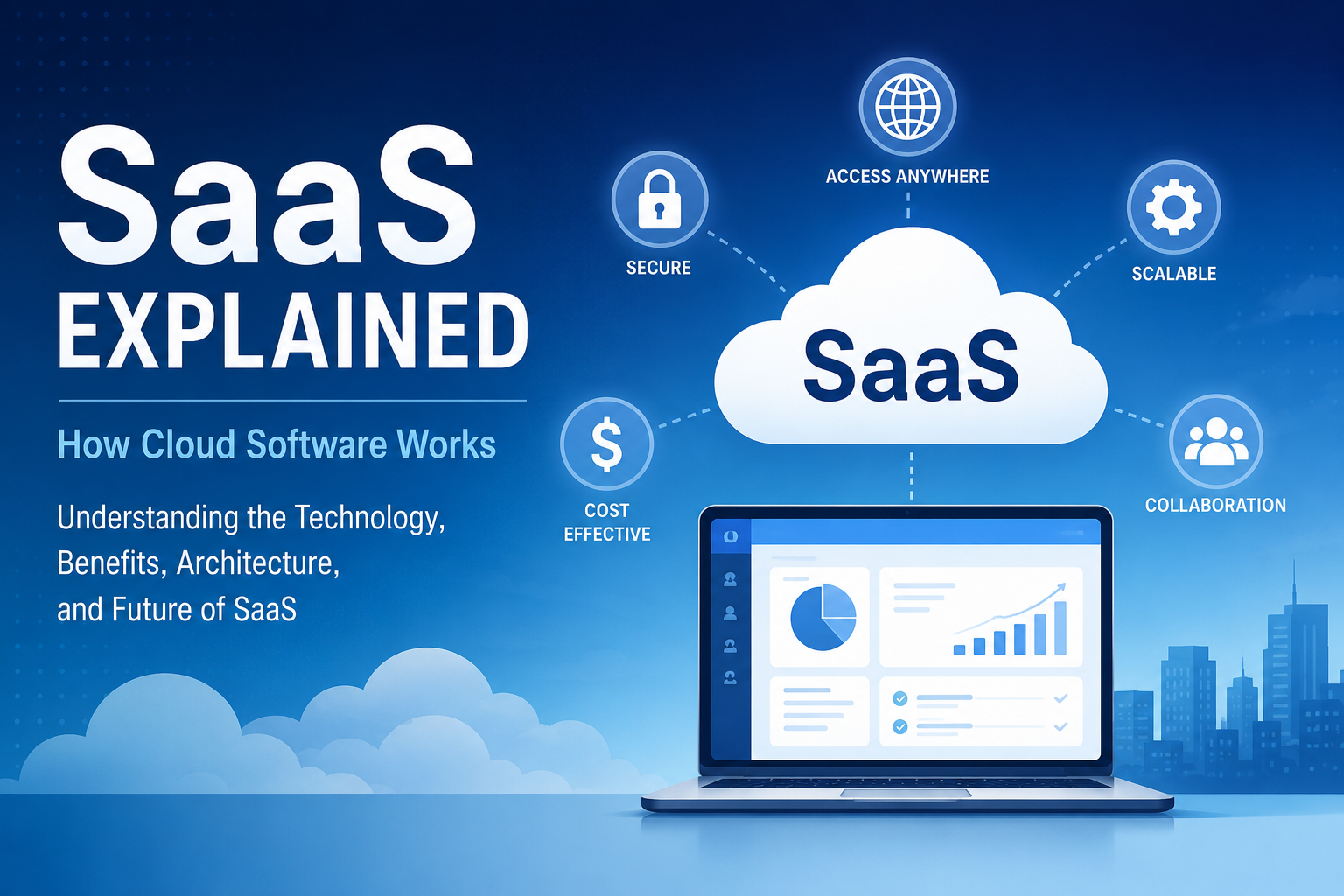
Software has come a long way from the days of purchasing CDs, installing programs manually, and waiting for periodic updates. Today, most applications are delivered over the internet, allowing users to access powerful tools from virtually anywhere without worrying about installation, maintenance, or hardware limitations. This modern approach to software delivery is known as Software as a Service (SaaS).
Whether you’re collaborating with your team through an online workspace, storing files in the cloud, managing customer relationships, or hosting virtual meetings, chances are you’re already using multiple SaaS applications every day. Businesses of all sizes have embraced SaaS because it offers flexibility, lower upfront costs, automatic updates, and the ability to scale quickly as needs change.
For individuals, SaaS provides convenience and accessibility. Instead of installing software on a single device, users can simply log in through a web browser or mobile app and continue their work from almost anywhere. For organizations, SaaS reduces the burden of maintaining expensive infrastructure while enabling employees to collaborate seamlessly across different locations.
As cloud computing continues to evolve, SaaS has become one of the most widely adopted cloud service models. From startups to multinational enterprises, organizations rely on SaaS platforms to improve productivity, streamline operations, and accelerate digital transformation.
In this beginner-friendly guide, you’ll learn:
- What Software as a Service (SaaS) is
- How cloud software works behind the scenes
- The core components of a SaaS platform
- Why businesses are rapidly adopting SaaS solutions
- Common examples of SaaS applications
- How SaaS compares to other cloud service models
- Security considerations and best practices
- How to choose the right SaaS solution for your needs
By the end of this guide, you’ll have a clear understanding of how SaaS works and why it has become the foundation of modern cloud computing.
What Is Software as a Service (SaaS)?
Software as a Service (SaaS) is a cloud computing model where software applications are hosted by a service provider and delivered to users over the internet. Instead of purchasing software licenses, installing programs locally, and managing updates manually, users simply subscribe to the service and access it through a web browser or dedicated application.
The cloud provider is responsible for managing the infrastructure, servers, storage, networking, security, software updates, and ongoing maintenance. Users can focus on using the application rather than maintaining the technology behind it.
Unlike traditional software, SaaS applications are centrally managed, ensuring that everyone uses the latest version without needing manual upgrades.
A Simple Analogy
Imagine using a ride-sharing service instead of owning a car.
Owning a car means you’re responsible for purchasing it, maintaining it, paying for insurance, fuel, repairs, and parking.
Using a ride-sharing service means you simply request a ride whenever you need one, while the service provider manages the vehicles, maintenance, and operations.
Traditional software works much like owning a car, while SaaS is similar to using a ride-sharing service—you access the software whenever you need it without worrying about the underlying infrastructure.
Traditional Software vs SaaS
| Traditional Software | SaaS |
| Installed on local computers | Accessed via the internet |
| One-time purchase or perpetual license | Subscription-based pricing |
| Manual software updates | Automatic updates |
| Local data storage | Cloud-based storage |
| Hardware maintenance required | Managed by the provider |
| Limited remote accessibility | Accessible from anywhere |
| IT team manages servers | Provider manages infrastructure |
| Higher upfront investment | Lower initial cost |
This shift has significantly reduced the complexity of deploying and maintaining software, making advanced applications accessible to businesses of all sizes.
Key Characteristics of SaaS
Most SaaS platforms share several common characteristics:
Cloud-Based Access
Users connect to the application through the internet rather than installing software on individual devices.
Subscription Pricing
Most SaaS providers offer monthly or annual subscription plans, allowing organizations to pay only for what they use.
Automatic Updates
Software updates, security patches, and new features are deployed automatically by the provider, eliminating manual upgrades.
Scalability
Businesses can easily increase or decrease the number of users, storage capacity, or features as requirements evolve.
Multi-Device Support
Modern SaaS applications work across desktops, laptops, tablets, and smartphones, enabling users to stay productive from virtually anywhere.
Centralized Management
Data, configurations, and user permissions are managed centrally, simplifying administration and improving consistency.
How SaaS Works
Although SaaS applications appear simple from a user’s perspective, they rely on a sophisticated cloud infrastructure operating behind the scenes.
When you open a SaaS application in your browser, a series of coordinated processes occur almost instantly.
Step 1: User Access
A user enters the application’s web address or launches the mobile application.
The request travels securely over the internet to the SaaS provider’s cloud environment.
Step 2: Authentication
Before granting access, the application verifies the user’s identity using authentication methods such as:
- Username and password
- Multi-factor authentication (MFA)
- Single Sign-On (SSO)
- OAuth authentication
- Identity providers like Microsoft Entra ID or Google Identity
Successful authentication ensures that only authorized users can access the application and its data.
Step 3: Request Processing
Once authenticated, the request reaches the application’s servers.
These servers process user actions, including:
- Opening dashboards
- Creating documents
- Saving files
- Running reports
- Sending messages
- Managing customer records
Business logic determines how the application responds to each request.
Step 4: Database Operations
Most SaaS applications rely on cloud-hosted databases to store information such as:
- User accounts
- Documents
- Customer information
- Financial records
- Application settings
- Activity logs
Whenever data is created, updated, or deleted, the database processes the request and returns the appropriate information.
Step 5: Response Delivery
The processed data is sent back to the user’s browser or application, where it is displayed through an interactive interface.
Modern SaaS applications use responsive web technologies to ensure a consistent experience across different devices and screen sizes.
Step 6: Continuous Monitoring
Throughout this process, monitoring systems track:
- Performance metrics
- Security events
- System health
- Resource utilization
- Error rates
- User activity
This helps providers identify and resolve issues before they impact users.
Simplified SaaS Workflow
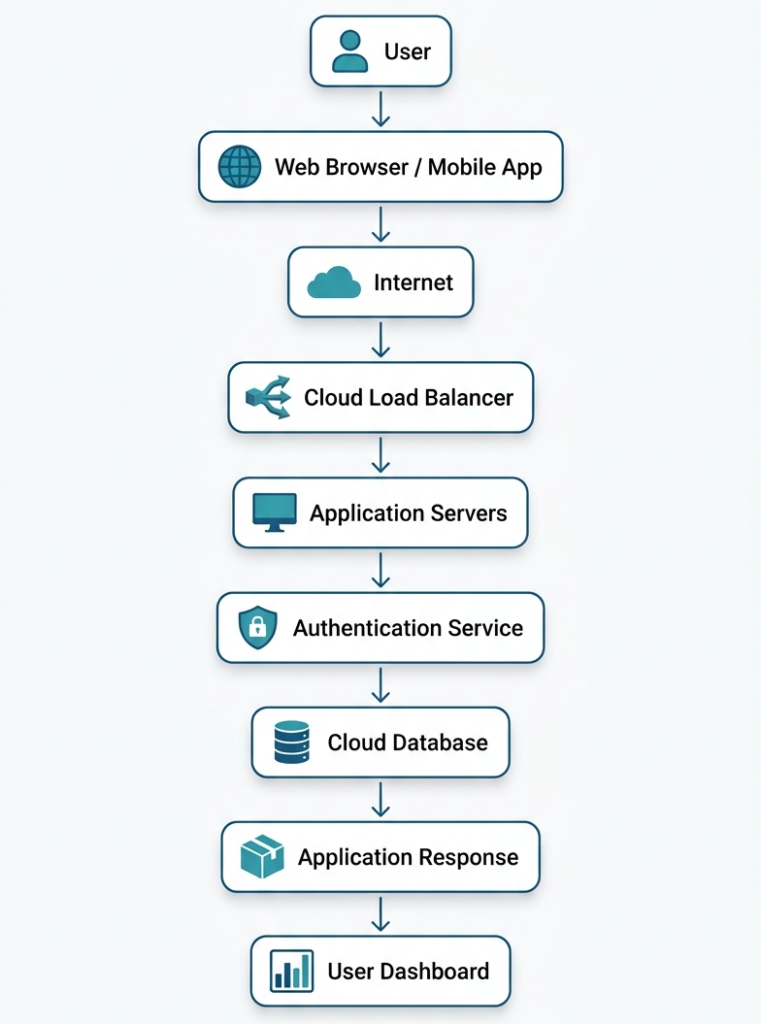
This architecture enables millions of users to access the same application simultaneously while maintaining performance and reliability.
Key Components of a SaaS Platform
Every SaaS application consists of several interconnected components that work together to deliver a seamless user experience.
1. User Interface (Frontend)
The frontend is the part of the application users interact with directly.
It includes:
- Dashboards
- Menus
- Forms
- Reports
- Charts
- Navigation
- Mobile interfaces
Modern frontends are designed to be responsive, ensuring they function well across desktops, tablets, and smartphones.
2. Application Backend
The backend contains the application’s business logic.
It handles tasks such as:
- Processing user requests
- Running calculations
- Managing workflows
- Enforcing business rules
- Coordinating communication between services
The backend acts as the brain of the SaaS platform.
3. Cloud Infrastructure
Cloud infrastructure provides the computing resources needed to run the application.
This includes:
- Virtual machines
- Containers
- Storage systems
- Networking
- Load balancers
- Backup services
Leading cloud providers offer highly available infrastructure that allows SaaS providers to serve users globally.
4. Database
Databases store the application’s information securely.
Common types include:
- Relational databases
- NoSQL databases
- Distributed databases
- In-memory databases for faster performance
Many SaaS providers use multiple databases optimized for different workloads.
5. Authentication and Identity Management
Identity management controls who can access the application and what actions they can perform.
Features often include:
- Role-Based Access Control (RBAC)
- Single Sign-On (SSO)
- Multi-Factor Authentication (MFA)
- Password policies
- Session management
- User provisioning
Strong identity management is essential for protecting sensitive business data.
6. APIs (Application Programming Interfaces)
APIs allow SaaS platforms to communicate with other software systems.
For example, a CRM application may integrate with:
- Email platforms
- Payment gateways
- Accounting software
- Marketing automation tools
- Customer support platforms
These integrations enable organizations to automate workflows and reduce manual data entry.
7. Monitoring and Analytics
SaaS providers continuously monitor their platforms to ensure optimal performance.
Monitoring systems track:
- Server uptime
- CPU and memory usage
- Response times
- Database performance
- Security events
- User behavior
- Error logs
These insights help providers improve reliability, optimize performance, and deliver a better user experience.
SaaS Architecture Explained
Behind every successful Software as a Service (SaaS) application is a carefully designed architecture that ensures the platform remains secure, scalable, reliable, and capable of serving thousands—or even millions—of users simultaneously.
Unlike traditional software installed on individual computers, SaaS applications run on cloud infrastructure. This allows providers to centrally manage software updates, security patches, and performance improvements while delivering a consistent experience to every customer.
Understanding SaaS architecture helps businesses appreciate why cloud software can scale efficiently without requiring users to manage servers or complex IT infrastructure.
Core Layers of SaaS Architecture
A modern SaaS platform is typically organized into several interconnected layers, each responsible for a specific function.
1. Presentation Layer
The presentation layer is the interface users interact with daily. It includes:
- Web applications
- Mobile apps
- Customer dashboards
- Admin portals
- Reporting interfaces
This layer focuses on delivering a responsive, intuitive, and user-friendly experience across different devices.
2. Application Layer
The application layer contains the business logic that powers the software.
It processes requests such as:
- Creating user accounts
- Managing customer records
- Generating invoices
- Running analytics
- Sending notifications
- Handling workflows
This layer acts as the “brain” of the application.
3. Data Layer
The data layer stores and manages all application data securely.
Examples include:
- Customer information
- Documents
- Transaction history
- Product catalogs
- User preferences
- System logs
Depending on the application, providers may use SQL, NoSQL, or distributed databases to optimize performance and reliability.
4. Infrastructure Layer
The infrastructure layer provides the computing resources needed to operate the SaaS platform.
It includes:
- Cloud servers
- Storage systems
- Networking
- Firewalls
- Load balancers
- Backup systems
- Monitoring tools
This layer ensures the application remains available even during periods of heavy traffic.
Multi-Tenant vs Single-Tenant Architecture
One of the defining characteristics of SaaS platforms is how they organize customer data and computing resources. Two common approaches are multi-tenancy and single-tenancy.
Multi-Tenant Architecture
In a multi-tenant environment, multiple customers (known as tenants) share the same application instance and underlying infrastructure while keeping their data logically separated.
Benefits
- Lower operational costs
- Efficient use of resources
- Faster software updates
- Easier maintenance
- Highly scalable
Challenges
- Requires strong data isolation
- Shared resources can affect performance if not managed properly
- Greater complexity in security and compliance
Most modern SaaS providers use multi-tenant architecture because it enables them to serve many customers efficiently.
Single-Tenant Architecture
In a single-tenant model, each customer has a dedicated application instance and, in many cases, dedicated infrastructure.
Benefits
- Greater customization
- Stronger isolation
- Easier compliance for regulated industries
- Predictable performance
Challenges
- Higher costs
- More infrastructure to maintain
- Slower updates
- Less efficient resource utilization
Large enterprises or organizations with strict regulatory requirements often prefer this approach.
Multi-Tenant vs Single-Tenant Comparison
| Feature | Multi-Tenant | Single-Tenant |
| Infrastructure | Shared | Dedicated |
| Cost | Lower | Higher |
| Scalability | Excellent | Moderate |
| Maintenance | Centralized | Individual |
| Customization | Limited | Extensive |
| Updates | Automatic for all users | Can be scheduled individually |
| Resource Efficiency | High | Lower |
| Compliance Flexibility | Moderate | High |
How SaaS Platforms Scale
One of the biggest advantages of SaaS is the ability to handle growing numbers of users without significant downtime or performance issues.
Cloud providers achieve this using several technologies.
Horizontal Scaling
Instead of upgrading a single server, providers add more servers to distribute workloads.
Benefits include:
- Improved availability
- Better fault tolerance
- Easier expansion
- Reduced bottlenecks
Load Balancing
A load balancer distributes incoming user requests across multiple application servers.
This prevents any single server from becoming overloaded and improves response times.
Typical responsibilities include:
- Traffic distribution
- Health checks
- Failover management
- Session persistence
Auto Scaling
Many SaaS platforms automatically increase or decrease computing resources based on demand.
For example:
- During business hours, additional servers are launched.
- At night, unused resources are removed.
This approach reduces operational costs while maintaining performance.
Content Delivery Networks (CDNs)
A Content Delivery Network stores copies of static content—such as images, videos, and scripts—on servers located around the world.
Benefits include:
- Faster page loading
- Reduced latency
- Lower bandwidth usage
- Improved global performance
Common SaaS Pricing Models
Unlike traditional software that often requires a large upfront purchase, SaaS typically uses flexible pricing models that make software more accessible to individuals and businesses alike.
1. Free Plan
Some providers offer a completely free version with basic functionality.
Ideal for:
- Personal use
- Students
- Testing the platform
Limitations may include restricted storage, fewer features, or usage caps.
2. Freemium
The freemium model allows users to access core features for free while charging for advanced capabilities.
Examples of premium features:
- Additional storage
- Advanced analytics
- Team collaboration
- Automation
- Security controls
This model encourages users to upgrade as their needs grow.
3. Subscription-Based Pricing
The most common SaaS pricing model is a recurring subscription.
Customers pay:
- Monthly
- Quarterly
- Annually
Subscription plans often vary based on:
- Number of users
- Storage capacity
- Features
- Support level
This predictable pricing helps businesses budget more effectively.
4. Pay-As-You-Go
Some SaaS providers charge customers only for the resources they consume.
Billing may be based on:
- API requests
- Storage usage
- Data transfers
- Processing time
- Transactions
This model is popular among developer-focused platforms and cloud services.
5. Enterprise Licensing
Large organizations often require customized pricing that includes:
- Unlimited users
- Dedicated support
- Advanced security
- Compliance features
- Custom integrations
- Service Level Agreements (SLAs)
Enterprise contracts are usually negotiated based on organizational requirements.
Benefits of Software as a Service (SaaS)
The widespread adoption of SaaS is driven by the many advantages it offers compared to traditional software deployment models.
Lower Upfront Costs
Businesses no longer need to invest heavily in servers, software licenses, or expensive hardware.
Instead, they pay predictable subscription fees.
Faster Deployment
Many SaaS applications can be deployed within minutes or hours rather than weeks.
Users simply create an account, configure settings, and begin working.
Automatic Updates
Providers handle:
- Software upgrades
- Security patches
- Bug fixes
- Feature enhancements
Users always have access to the latest version without manual intervention.
Accessibility from Anywhere
Because SaaS applications are cloud-based, users can securely access them from:
- Offices
- Homes
- Customer sites
- Airports
- Mobile devices
This flexibility supports remote and hybrid work environments.
Easy Collaboration
Teams can work together in real time by sharing:
- Documents
- Projects
- Dashboards
- Reports
- Customer records
Centralized data eliminates version conflicts and improves productivity.
Scalability
Organizations can easily:
- Add new users
- Increase storage
- Enable additional features
- Expand globally
This flexibility makes SaaS suitable for startups and enterprises alike.
Improved Reliability
Leading SaaS providers invest in:
- Redundant infrastructure
- Automatic backups
- Disaster recovery
- High availability
- Continuous monitoring
These measures help minimize downtime and protect business operations.
Reduced IT Maintenance
Internal IT teams spend less time managing:
- Servers
- Updates
- Software installations
- Hardware failures
- Security patches
This allows them to focus on strategic initiatives rather than routine maintenance.
Challenges and Limitations of SaaS
Despite its many advantages, SaaS is not the perfect solution for every organization. Understanding potential limitations helps businesses make informed decisions.
Internet Dependency
Since SaaS applications are accessed online, a reliable internet connection is essential.
Poor connectivity can affect productivity and user experience.
Vendor Lock-In
Migrating from one SaaS provider to another may involve:
- Data migration
- Staff retraining
- Workflow changes
- Integration updates
Organizations should evaluate exit strategies before committing to a platform.
Limited Customization
Compared to on-premises software, SaaS solutions may offer fewer customization options.
Businesses with highly specialized workflows may require additional integrations or custom development.
Data Privacy and Compliance
Organizations operating in regulated industries must ensure their SaaS provider complies with standards such as:
- GDPR
- HIPAA
- SOC 2
- ISO 27001
Failure to meet regulatory requirements can introduce legal and security risks.
Downtime Risks
Although leading providers maintain excellent uptime, no cloud platform is completely immune to outages.
Businesses should review:
- Service Level Agreements (SLAs)
- Backup procedures
- Disaster recovery capabilities
- Incident response processes
Subscription Costs Over Time
While SaaS reduces upfront expenses, recurring subscription fees can accumulate over the long term—especially for organizations with many users or multiple SaaS applications.
Regularly reviewing software usage helps control costs and eliminate unused licenses.
SaaS Security Best Practices
As organizations increasingly rely on Software as a Service (SaaS) for critical business operations, protecting cloud-based applications and sensitive data has become a top priority. While reputable SaaS providers invest heavily in securing their platforms, security is a shared responsibility. Providers secure the underlying infrastructure, while customers are responsible for managing user access, protecting credentials, and configuring the platform securely.
Implementing strong security practices helps reduce the risk of unauthorized access, data breaches, and compliance issues.
Enable Multi-Factor Authentication (MFA)
Passwords alone are no longer sufficient to protect online accounts. Multi-Factor Authentication (MFA) adds an extra layer of security by requiring users to verify their identity using an additional factor, such as:
- Authentication apps
- Hardware security keys
- SMS or email verification codes
- Biometric authentication (fingerprint or facial recognition)
Even if a password is compromised, MFA significantly reduces the likelihood of unauthorized access.
Use Strong Identity and Access Management (IAM)
Not every employee needs access to every feature or dataset. Identity and Access Management (IAM) helps organizations enforce the principle of least privilege, granting users only the permissions necessary to perform their roles.
Common IAM practices include:
- Role-Based Access Control (RBAC)
- Single Sign-On (SSO)
- User lifecycle management
- Temporary access for contractors
- Regular permission reviews
Proper access control minimizes the impact of compromised accounts and reduces insider risks.
Encrypt Data at Rest and in Transit
Encryption protects sensitive information by converting it into unreadable data that can only be accessed with the appropriate decryption key.
SaaS providers typically use encryption in two ways:
- Data at Rest: Protects information stored in databases and backups.
- Data in Transit: Secures information as it travels between users and cloud servers using protocols such as HTTPS and TLS.
Encryption helps safeguard customer data from interception and unauthorized access.
Regularly Review User Accounts
Over time, organizations accumulate inactive accounts, former employees, and unnecessary permissions. Conducting periodic account reviews helps ensure that only authorized individuals retain access to SaaS applications.
Best practices include:
- Removing inactive accounts
- Disabling accounts for departed employees
- Reviewing administrator privileges
- Auditing third-party integrations
- Monitoring login activity
Routine audits reduce security risks and support regulatory compliance.
Keep Integrations Secure
Modern SaaS platforms often integrate with dozens of third-party applications. While these integrations improve productivity, they can also introduce security vulnerabilities if not managed properly.
Organizations should:
- Use trusted integrations
- Regularly review connected applications
- Remove unused integrations
- Limit API permissions
- Monitor integration activity
Only grant third-party applications the minimum permissions they require.
Back Up Critical Data
Although SaaS providers typically maintain backups for disaster recovery, organizations should evaluate whether additional backups are necessary for business continuity or compliance.
A strong backup strategy should include:
- Regular backup schedules
- Secure storage locations
- Recovery testing
- Version history
- Retention policies
Independent backups provide an additional layer of protection against accidental deletion, ransomware, or service disruptions.
Monitor Security Activity
Continuous monitoring helps organizations detect suspicious behavior before it becomes a major security incident.
Useful monitoring activities include:
- Failed login attempts
- Unusual geographic logins
- Privilege escalation
- Large data exports
- API abuse
- Malware detection
Many SaaS platforms provide built-in security dashboards and audit logs to support incident detection and response.
Maintain Compliance
Organizations operating in regulated industries should verify that their SaaS providers support relevant compliance frameworks.
Common certifications and standards include:
- ISO 27001
- SOC 2
- GDPR
- HIPAA
- PCI DSS
Meeting compliance requirements helps protect customer data while reducing legal and financial risks.
SaaS vs PaaS vs IaaS
Software as a Service is only one of the three primary cloud computing service models. Understanding how SaaS compares with Platform as a Service (PaaS) and Infrastructure as a Service (IaaS) helps businesses choose the right solution for their needs.
| Feature | SaaS | PaaS | IaaS |
| Primary Purpose | Ready-to-use software | Application development platform | Cloud infrastructure |
| Managed By Provider | Infrastructure, platform, and software | Infrastructure and platform | Infrastructure only |
| Customer Manages | User accounts and data | Applications and data | Operating systems, applications, and data |
| Technical Expertise Required | Low | Moderate | High |
| Typical Users | End users and businesses | Developers | IT administrators |
| Deployment Speed | Fast | Moderate | Flexible |
| Customization | Limited | High | Very High |
| Common Use Cases | Collaboration, CRM, email | Building web apps, APIs | Hosting servers, virtual machines |
Understanding the Differences
Software as a Service (SaaS)
SaaS provides fully functional applications that users can access immediately without worrying about infrastructure or software maintenance.
Examples include:
- Email platforms
- Customer Relationship Management (CRM)
- Project management software
- Video conferencing
- File sharing
This model is ideal for organizations seeking quick deployment with minimal IT overhead.
Platform as a Service (PaaS)
PaaS provides developers with a cloud-based environment for building, testing, and deploying applications.
The cloud provider manages:
- Servers
- Operating systems
- Networking
- Runtime environments
Developers focus on writing and deploying code without maintaining infrastructure.
Typical use cases include:
- Web application development
- API development
- Mobile app backends
- Continuous integration and deployment (CI/CD)
Infrastructure as a Service (IaaS)
IaaS offers virtualized computing resources over the internet.
Organizations can provision:
- Virtual machines
- Storage
- Networking
- Firewalls
- Load balancers
Customers manage the operating systems, applications, and security configurations, making IaaS highly flexible but also more complex.
This model is often chosen by organizations that require maximum control over their computing environment.
Popular SaaS Examples
Many of the applications people use every day are delivered through the Software as a Service model. These platforms eliminate the need for local installations while enabling users to collaborate and access data from anywhere.
Productivity Suites
Cloud productivity suites allow users to create documents, spreadsheets, presentations, and email directly from a web browser.
Common capabilities include:
- Real-time collaboration
- Automatic saving
- Cloud storage
- Shared calendars
- Team communication
These platforms are widely used by businesses, educational institutions, and remote teams.
Customer Relationship Management (CRM)
CRM platforms help organizations manage customer interactions throughout the sales lifecycle.
Typical features include:
- Lead tracking
- Contact management
- Sales forecasting
- Marketing automation
- Customer support
- Reporting dashboards
Cloud-based CRM solutions centralize customer information, making it accessible across departments.
Team Collaboration Platforms
Modern workplaces depend on cloud collaboration tools for communication and project coordination.
Common features include:
- Instant messaging
- Video meetings
- File sharing
- Task management
- Team channels
- Workflow automation
These applications support hybrid and remote work by keeping teams connected regardless of location.
Cloud Storage Services
Cloud storage platforms allow users to securely store, synchronize, and share files across multiple devices.
Benefits include:
- Automatic synchronization
- File version history
- Secure sharing
- Offline access
- Backup and recovery
Organizations rely on cloud storage to simplify collaboration while reducing dependence on local hardware.
Design and Creative Platforms
Creative professionals increasingly use browser-based design tools for graphics, presentations, marketing materials, and multimedia content.
Cloud-based design software offers:
- Team collaboration
- Template libraries
- Automatic saving
- Cross-device accessibility
- Version control
These capabilities make design projects more efficient for distributed teams.
Project Management Software
Project management SaaS platforms help organizations organize tasks, monitor progress, and improve collaboration.
Typical features include:
- Task boards
- Gantt charts
- Team assignments
- Deadlines
- Progress tracking
- Reporting
These tools improve visibility across projects while supporting agile and traditional project management methodologies.
Developer Collaboration Platforms
Software development teams also benefit from SaaS applications that streamline coding and collaboration.
Common capabilities include:
- Source code repositories
- Version control
- Issue tracking
- Continuous integration
- Code reviews
- Documentation
These platforms simplify software development workflows for teams of all sizes.
Industries That Benefit from SaaS
SaaS solutions are no longer limited to technology companies. Today, organizations across nearly every industry rely on cloud software to improve efficiency and reduce operational costs.
Healthcare
Healthcare organizations use SaaS for:
- Electronic health records
- Appointment scheduling
- Telemedicine
- Medical billing
- Patient communication
These platforms help streamline care while supporting regulatory compliance.
Education
Schools and universities leverage SaaS for:
- Online learning
- Student management
- Virtual classrooms
- Assessments
- Collaboration
Cloud-based educational tools make learning more accessible for both students and educators.
Retail and E-commerce
Retail businesses use SaaS platforms to manage:
- Inventory
- Online stores
- Customer loyalty
- Payment processing
- Marketing campaigns
- Sales analytics
These applications support both physical and online retail operations.
Financial Services
Financial organizations depend on SaaS for:
- Accounting
- Expense management
- Payroll
- Financial reporting
- Customer relationship management
Many platforms also include built-in compliance and security features.
Manufacturing
Manufacturers use SaaS to improve:
- Supply chain visibility
- Inventory management
- Production planning
- Equipment monitoring
- Workforce collaboration
Cloud software enables real-time visibility across manufacturing operations.
Small Businesses
Small businesses often adopt SaaS because it eliminates the need for expensive IT infrastructure.
Benefits include:
- Affordable subscriptions
- Easy deployment
- Automatic updates
- Professional-grade software
- Scalability as the business grows
This allows small organizations to compete using the same technologies as larger enterprises.
How to Choose the Right SaaS Solution
Selecting the right Software as a Service (SaaS) solution is more than comparing features and pricing. The right platform should align with your organization’s goals, integrate with your existing technology stack, and scale as your business grows.
Before committing to a SaaS provider, evaluate several key factors to ensure you’re making a long-term investment that delivers value.
1. Define Your Business Requirements
Start by identifying the problem you want the software to solve.
Ask questions such as:
- What business process needs improvement?
- Who will use the software?
- How many users require access?
- Which features are essential?
- Are there any industry-specific requirements?
Clearly defining your needs helps narrow down potential solutions and prevents paying for unnecessary features.
2. Evaluate Security Features
Since SaaS applications often store sensitive business information, security should be a top priority.
Look for providers that offer:
- Multi-Factor Authentication (MFA)
- Single Sign-On (SSO)
- Data encryption
- Role-Based Access Control (RBAC)
- Audit logs
- Security monitoring
- Regular security updates
Review the provider’s security documentation and compliance certifications before making a decision.
3. Consider Scalability
Your software should support your organization not only today but also in the future.
Evaluate whether the platform can:
- Support additional users
- Increase storage capacity
- Handle higher workloads
- Expand to multiple locations
- Support business growth without major disruptions
Scalable SaaS solutions reduce the need for costly migrations later.
4. Review Integration Capabilities
Most businesses use multiple software applications. A SaaS platform should integrate seamlessly with your existing tools.
Common integrations include:
- CRM systems
- Accounting software
- Email platforms
- Collaboration tools
- Marketing automation
- Payment gateways
- Business intelligence platforms
Strong integration capabilities reduce manual work and improve productivity.
5. Understand the Pricing Model
Compare pricing carefully beyond the advertised monthly fee.
Consider:
- Per-user pricing
- Storage limits
- Premium feature costs
- API usage charges
- Support plans
- Contract length
- Renewal terms
Calculating the total cost of ownership helps avoid unexpected expenses.
6. Assess Reliability and Performance
Business operations often depend on SaaS applications being available around the clock.
Review the provider’s:
- Uptime guarantees (Service Level Agreements)
- Disaster recovery strategy
- Backup procedures
- Global infrastructure
- Historical outage record
Reliable providers typically offer uptime commitments of 99.9% or higher.
7. Evaluate Customer Support
Responsive support becomes critical when technical issues arise.
Look for providers offering:
- 24/7 support
- Live chat
- Phone support
- Knowledge bases
- Community forums
- Dedicated account managers for enterprise customers
Excellent customer support can significantly reduce downtime during critical situations.
Future of Software as a Service (SaaS)
SaaS continues to evolve as new technologies reshape how software is built, delivered, and used. Several emerging trends are expected to influence the next generation of cloud applications.
Artificial Intelligence Integration
Artificial Intelligence (AI) is becoming a standard feature in modern SaaS platforms.
AI-powered capabilities include:
- Intelligent automation
- Predictive analytics
- Chatbots and virtual assistants
- Content generation
- Personalized recommendations
- Fraud detection
These features help organizations improve productivity while reducing repetitive manual tasks.
Low-Code and No-Code Development
Businesses increasingly want to build applications without extensive programming knowledge.
Low-code and no-code platforms allow users to:
- Create workflows
- Build dashboards
- Develop internal tools
- Automate business processes
- Connect cloud services
This accelerates digital transformation while reducing development costs.
Vertical SaaS
Instead of serving every industry, many SaaS providers now focus on specialized markets.
Examples include software designed specifically for:
- Healthcare
- Manufacturing
- Legal services
- Construction
- Hospitality
- Real estate
- Education
Industry-specific solutions often include workflows and compliance features tailored to unique business needs.
Increased Automation
Automation continues to reduce repetitive tasks across organizations.
Modern SaaS platforms increasingly automate:
- Data entry
- Customer support
- Marketing campaigns
- Invoice processing
- Employee onboarding
- Report generation
Automation enables teams to focus on higher-value work while improving operational efficiency.
Enhanced Cybersecurity
As cyber threats continue to evolve, SaaS providers are investing heavily in security innovations.
Emerging security technologies include:
- Zero Trust Architecture
- AI-powered threat detection
- Behavioral analytics
- Passwordless authentication
- Continuous risk assessment
- Automated incident response
These advancements strengthen protection against increasingly sophisticated attacks.
Greater Personalization
Modern SaaS applications are becoming more adaptive.
Future platforms will provide:
- Personalized dashboards
- Role-specific workflows
- Intelligent recommendations
- Adaptive user interfaces
- Customized reporting
This creates a more efficient and engaging user experience.
Edge Computing Integration
As organizations generate more real-time data, SaaS platforms are beginning to leverage edge computing.
Benefits include:
- Lower latency
- Faster processing
- Improved IoT support
- Better real-time analytics
- Reduced bandwidth usage
Edge computing is expected to play a growing role in industries requiring instant data processing.
Frequently Asked Questions (FAQ)
1. What is Software as a Service (SaaS)?
Software as a Service (SaaS) is a cloud computing model where applications are hosted by a provider and accessed over the internet through a web browser or mobile app. Users subscribe to the service instead of installing software on their own devices.
2. What are some examples of SaaS applications?
Popular SaaS applications include email platforms, project management software, customer relationship management (CRM) systems, cloud storage services, video conferencing tools, accounting software, and collaboration platforms.
3. What is the difference between SaaS and traditional software?
Traditional software is installed and maintained on local computers or servers, requiring manual updates and hardware management. SaaS applications are hosted in the cloud, automatically updated, and accessible from virtually anywhere with an internet connection.
4. Is SaaS secure?
Yes. Reputable SaaS providers implement strong security measures such as encryption, Multi-Factor Authentication (MFA), access controls, continuous monitoring, and regular security updates. However, customers also share responsibility by properly managing user accounts and permissions.
5. What are the benefits of SaaS?
Some of the biggest advantages include:
- Lower upfront costs
- Automatic updates
- Easy scalability
- Remote accessibility
- Improved collaboration
- Reduced IT maintenance
- Faster deployment
- Flexible subscription pricing
6. What are the disadvantages of SaaS?
Potential limitations include:
- Dependence on internet connectivity
- Vendor lock-in
- Limited customization
- Ongoing subscription costs
- Compliance considerations
- Temporary service outages
Organizations should evaluate these factors before adopting a SaaS solution.
7. What is the difference between SaaS, PaaS, and IaaS?
- SaaS provides ready-to-use software applications.
- PaaS offers a cloud platform for developers to build applications.
- IaaS provides virtualized infrastructure such as servers, storage, and networking.
Each model serves different business and technical needs.
8. Why do businesses prefer SaaS?
Businesses choose SaaS because it reduces infrastructure costs, simplifies software management, enables remote work, improves collaboration, and allows organizations to scale quickly without major hardware investments.
9. Can small businesses use SaaS?
Absolutely. SaaS solutions are especially beneficial for small businesses because they provide enterprise-grade software without requiring expensive infrastructure or dedicated IT teams.
10. How do I choose the right SaaS provider?
Evaluate providers based on:
- Security
- Reliability
- Pricing
- Features
- Scalability
- Integrations
- Compliance
- Customer support
- User reviews
Selecting the right provider ensures long-term value and minimizes migration challenges.
Conclusion
Software as a Service (SaaS) has fundamentally changed how organizations access and manage software. By delivering applications through the cloud, SaaS eliminates the complexity of installing, maintaining, and updating software on individual devices. This approach enables businesses to focus on innovation and productivity while leaving infrastructure management to the service provider.
Throughout this guide, we’ve explored how SaaS works, the architecture that powers cloud applications, pricing models, security best practices, and the differences between SaaS, PaaS, and IaaS. We’ve also examined common use cases, industry applications, and the key factors organizations should consider when selecting a SaaS solution.
The growing adoption of SaaS reflects its ability to deliver flexibility, scalability, and cost efficiency for organizations of all sizes. Whether you’re a startup seeking affordable business tools or a large enterprise modernizing operations, SaaS offers a practical and future-ready approach to software delivery.
As technologies such as Artificial Intelligence (AI), automation, low-code development, and edge computing continue to evolve, SaaS platforms will become even more intelligent, secure, and integrated. Organizations that understand these trends and adopt the right cloud solutions will be better positioned to improve efficiency, enhance collaboration, and remain competitive in an increasingly digital world.
By carefully evaluating business needs, security requirements, scalability, and provider reliability, you can confidently choose SaaS solutions that support your long-term goals and drive sustainable growth.